Pātai Pūputu FAQ
Under construction!
Please send us your pātai (questions) and we will post answers here.
Favourites and Collections
When you have an account, you can save 'Favourite' lessons, add notes to your favourites and create Collections. These are only seen by you when logged in, unless you choose to share a copy with colleagues.
- To add or access your Favourites, you must be signed in.
- Click on your user name (or Initial on mobile) and select the menu item "My Favouritesopen_in_new"
- Your 'favourite' lessons will appear on the Favourites page (please refresh if they don't show up immediately).
- To remove a lesson from Favourites, use the 'rubbish bin' icon on the lesson in Favourites, or click on the "Remove from favourites" button on the lesson page.
- You can add and edit your own notes for each lesson.
- These are not shared with other users. They are only visible to you. Deleting your notes, removes them permanently.
- Notes remain the same across multiple collections as these are linked to the lesson page, not the collection.
- You can also add your Favourites to a 'Collection' of resources (use the [+] button).
- If the lessons you want to add are not yet in your favourites, you can add them by clicking the ‘Add to Favourites’ button on the lesson page. You can then add the lesson to one or more collections.
- You can share a link to your Collection with your colleagues (click on the "..."). Sharing will only share a copy of your collection - not your notes or any updates you make to this collection.
- Lessons can be added to more than one Collection, but the notes will remain the same for each (refresh if they don't show immediately).
- Please note that we are able to see how many users have added lessons to their Favourites or downloaded lessons. This helps us to assess the usefulness or each resource, so that we can continue to improve this tool for you. We cannot see who has downloaded lessons and you do not need an account or to be logged in to do so. Our administrator can access collated data on what pages are added to Favourites, but will not use this for any other purpose than to assess the value of each resource and the site as a whole.
-
Your privacy is important to us. Please read our privacy statementopen_in_newopen_in_new on the main Greater Wellington page. Download a copy of our Privacy Statement.open_in_newopen_in_new
Creating an account
We've tried to make the sign up process simple and free. But you may find a few niggles as we continue to develop this resource. Below are the steps you will go through during sign up, and what to expect.
Please contact us if you have any questions. And check your spam folders for our 'Verify' email.
Once verified, you will not receive another confirmation email from us (including for Movin'March registrations). Any other news or updates will be communicated via our MailChimp newsletter.
- The website itself goes to this pop up:
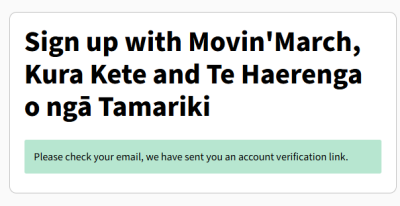 Next you will need to verify your email address.
You will receive an email from "no-reply@gw.govt.nz" with the subject "Verify your account".

You will get an email asking you to verify your email to fully sign up.
The link is right down the bottom, after our email signature, and before the Copyright information.
Click on this link.
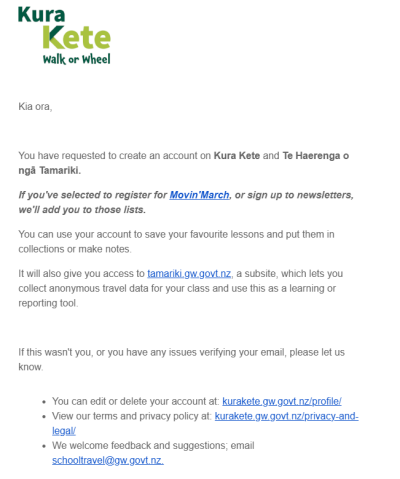
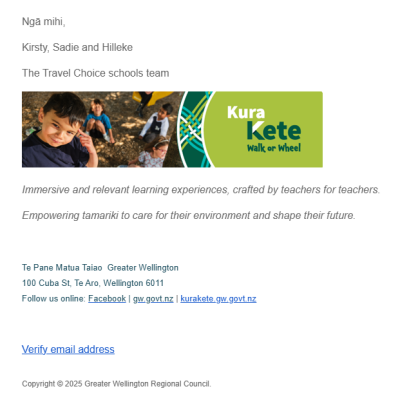
When you click on the ‘verify’ link you will see this:
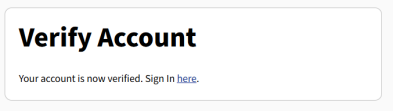 Click on the Sign in link to go to the log in page.
Once logged in you can stay logged in, or save you password as you normally would.
We are working on merging Kura Kete and Te Haerenga o ngā Tamariki to create an easier user experience for you.
- This means that if you create a new account for one, you will soon be able to use it for both sites.
- If you already had an account for Te Haerenga o ngā Tamariki, you can soon use this for Kura Kete.
- If you have both, then your Kura Kete password should work. If not, let us know and we can reset this for you.
As always, get in touch if you have any questions or concerns.
Email us with your pātai (questions) and we will answer them ASAP!